JWT guide: decode, verify and sign JSON Web Tokens
A practical guide to JWTs — how they're structured, what every claim means, how to read the time claims, the difference between decoding and verifying, how to check a signature with a secret or public key (PEM, JWK, JWKS or OIDC discovery), how to decrypt an encrypted token (JWE), and why it's safe to do all of this locally.
Open the JWT Decoder & Encoder →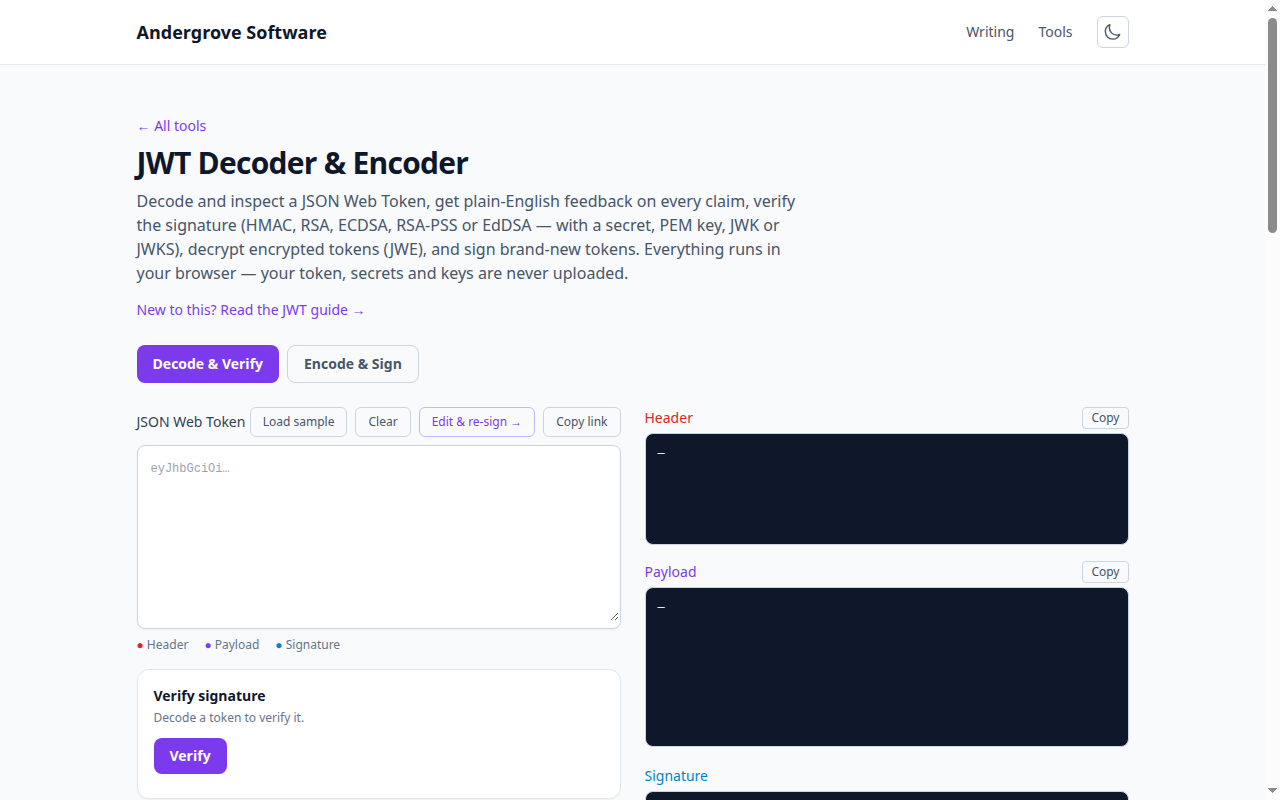
What this tool does
The JWT Decoder & Encoder splits a token into its three
parts, Base64URL-decodes the header and payload into colour-highlighted JSON, explains every
claim in plain English, turns the time claims into readable dates (hover any timestamp to see
local time, UTC, ISO 8601, the relative time and the raw Unix value), flags problems like
expiry or an unsecured alg: none, and verifies the signature. It can also
decrypt encrypted tokens (JWE), build and sign brand-new
tokens, and push a decoded token back into the editor with Edit & re-sign
so you can tweak a claim and watch the signature break. Everything runs in your browser.
How a JWT is structured
A JWT is three Base64URL sections joined by dots: header.payload.signature.
The header names the algorithm (e.g. HS256) and optionally a key id (kid), the
payload holds the claims, and the signature is computed over the first two parts with a
secret or private key. In the tool, each part is colour-coded so you can see the boundaries
at a glance.
Decoding vs verifying
Decoding just reveals the header and payload — anyone can do it, so the payload is not secret and must never hold passwords or sensitive data. Verifying recomputes the signature with the secret (or key) to prove the token is authentic and unmodified. A decoded-but-unverified token tells you nothing about whether it can be trusted.
Standard claims
ississuer,subsubject,audaudience — who issued the token, who it's about, and who it's for.iatissued-at,nbfnot-before,expexpiry — shown as dates with a live "expires in / expired" status. Hover a value for the full breakdown across time zones and formats.jtia unique token id, plus OIDC extras likeazp,scopeandnonce— all annotated in the claims table.
Verifying the signature
The tool reads the algorithm from the header and shows the right input automatically:
- HMAC (HS256/384/512) — paste the shared secret and pick how it's encoded: plain UTF-8 text, Base64/Base64URL, or hex (many frameworks store HMAC keys hex-encoded).
- RSA, RSA-PSS, ECDSA and EdDSA (RS/PS/ES 256/384/512, Ed25519) — paste
the public key as a PEM
PUBLIC KEY, a PEM X.509CERTIFICATE(the public key is extracted automatically), a JWK, or a full JWKS. With a JWKS the correct key is selected using the token'skid. You can also fetch a JWKS by URL — only that endpoint is contacted, and your token is never sent. - Don't know the JWKS URL? Press From issuer and the tool
performs OpenID Connect discovery on the token's
issclaim — it fetches{issuer}/.well-known/openid-configuration, readsjwks_uri, then downloads the keys and verifies in one step. This is the quickest way to check a real Auth0, Keycloak or Cognito token.
Encoding and signing
Switch to Encode & Sign to craft a token: pick an algorithm (HMAC, RSA,
RSA-PSS, ECDSA or EdDSA), edit the header and payload (one-click buttons add
iat, nbf and exp), then sign with a secret or private
key. No key handy? Generate an RSA, EC or Ed25519 key pair in-browser, shown as PEM or JWK —
the private key signs and the public key is shown for you to share for verification (the JWK
form drops straight into a test JWKS). These tokens are for testing and learning; never paste
production private keys on a shared machine.
The fastest way in is Edit & re-sign on the decode tab: it copies the
decoded header and payload into the encoder with the algorithm preselected. Change
role to admin, sign with a different secret, and verify against the
original key — watching the verification fail teaches more about token tampering than any
diagram.
Decrypting encrypted tokens (JWE)
A token with five dot-separated parts is not malformed — it's a
JWE, an encrypted JWT whose claims are genuinely hidden rather than merely
encoded. Paste one and the tool decodes the protected header, explains the key-management and
content-encryption algorithms (alg and enc), and opens a
Decrypt JWE panel with a hint matched to the algorithm: an RSA or EC private
key for RSA-OAEP and ECDH-ES, a symmetric key (Base64, hex or an oct JWK) for
dir and AES key wrap, or a password for PBES2. Decryption runs locally via Web
Crypto, and if the plaintext turns out to be a nested signed JWT (cty: "JWT"),
it is loaded straight back into the decoder so you can verify the inner signature too.
You'll meet JWEs around OIDC providers that encrypt ID tokens carrying personal data.
Built-in security checks
Every decoded token is linted against the common mistakes covered in
our JWT security post: an unsecured
alg: none header, an expired or not-yet-valid token, a missing expiry, a
lifetime longer than a day, claim names that look like credentials in the payload
(api_key, db_password, …), tokens too large for a typical
4 KB cookie, and missing iss/aud claims. The findings appear
as plain-English notes above the decoded payload — useful both for learning and for a quick
sanity review of the tokens your own service mints.
Sharing a token by link
Copy link builds a URL with the token in the #fragment
(/tools/jwt-decoder/#token=…), which opens the tool with the token already
decoded. Fragments are never sent to any server — not even ours — so the token stays in the
browser; just remember that anyone who has the link can read the token inside it, so share
test tokens, not production ones.
Privacy
Tokens often grant access, so a server-side decoder is a real risk. Here, decoding, verification, key generation and signing all run entirely in your browser via the Web Crypto API — nothing is uploaded. The only optional network request is fetching a JWKS URL you type, and even then your token stays local.
FAQ
Is decoding the same as verifying?
No — decoding reads the token; verifying checks the signature with the secret or key.
Which algorithms are supported?
HS256/384/512, RS256/384/512, PS256/384/512, ES256/384/512 and EdDSA (Ed25519), for both verifying and signing.
Can I verify a token against a JWKS endpoint?
Yes. Paste the JWKS JSON, fetch it by URL, or press From issuer to discover it automatically from the token's iss claim via OpenID Connect discovery. Only those URLs are contacted — your token and any secrets are never sent anywhere.
Can it decrypt encrypted JWTs (JWE)?
Yes — RSA-OAEP(-256), dir, A128/192/256KW, PBES2 passwords and ECDH-ES key management, with AES-GCM and AES-CBC-HS content encryption. All locally.
Is my token sent anywhere?
No — it all runs locally in your browser. Only a JWKS URL you choose to fetch is contacted.
Should I paste production tokens?
It's local and safe, but treat real tokens and private keys with care on shared machines.
Ready to try it? Open the JWT Decoder & Encoder →